Complete Guide to EVILBANE Character Customization
Master evilbane character customization with our expert guide. Discover appearance editing, gear setups, and build strategies for Netmarble Monster's title.
Published: EVILBANE Wiki Editorial Team
Table of Contents
Introduction to EVILBANE Character Customization
Diving into a brand-new action RPG can be overwhelming, but mastering evilbane character customization ensures you step onto the battlefield in style while optimizing your combat readiness. Whether you are testing out early builds or planning your long-term setup, understanding how to tweak your avatar's appearance and gear is essential for surviving brutal demon encounters. This comprehensive guide explores every facet of evilbane character customization, giving you the edge you need right from the start.
Netmarble Monster has crafted an engaging system where aesthetic choices meet tactical depth. When you first launch the Alpha Test build, available through the official EVILBANE Steam store page, you are immediately greeted with robust creation tools. Earlier 2025 pre-alpha sessions were distributed through official channels such as the Xbox Insider Hub. Let's break down how you can personalize your hero and dominate the apocalyptic ruins.
Step-by-Step Character Appearance Creation
Creating your ideal avatar involves balancing visual flair with practical design choices. According to community reports, players appreciate the initial freedom to mold their hero's look before jumping into fast-paced combat scenarios.
Select Gender and Base Model: Choose between male and female character bases, each featuring unique default stances and body proportions.
Adjust Facial Features: Modify eye color, skin tone, and facial structure to remove the default grumpy expression and establish a distinct identity.
Customize Hair and Headgear: Select hair color and length, and toggle helmet visibility using designated hotkeys (such as pressing 'H') to view your character's face.
Select Initial Outfit: Pick from various attire options—ranging from clerical robes to rugged armor—and apply your favorite color palettes.
The table below outlines the primary aesthetic modification categories available during the initial setup phase:
Customization Category
Available Options
Impact on Gameplay
Gender & Stance
Male / Female
Alters baseline animations and stance
Facial Aesthetics
Eye color, Skin tone, Hair length
Purely cosmetic; enhances immersion
Attire & Outfits
Clerical robes, Heavy armor variants
Visual style and thematic identity
Helmet Toggle
Visible / Hidden (Hotkey: H)
Exposes facial features during cutscenes
Equipping Weapons and Managing Loadouts
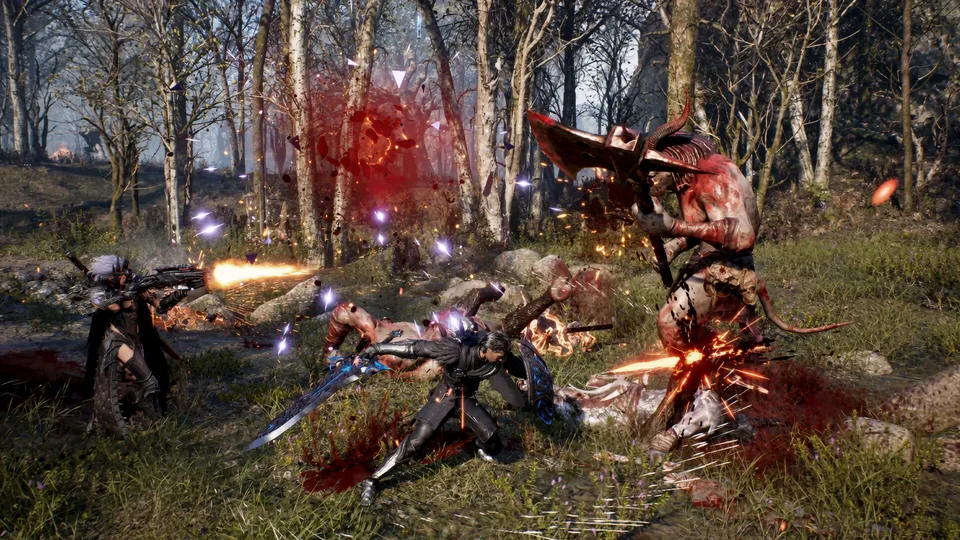
Beyond basic aesthetics, evilbane character customization deeply influences your combat efficiency. Players can equip one melee weapon and one ranged weapon simultaneously, creating a versatile hybrid fighting style. According to player experience during playtests, managing weapon elements and attack types is vital for breaking enemy stagger gauges.
Eternal Duty (Melee)
A sleek straight sword paired with a shield adorned with brilliant golden wings. Features lightning damage and strong defensive guard capabilities.
Illuminated Confection (Ranged)
An elegant crossbow with a cold, gleaming body that deals piercing damage without elemental constraints, perfect for precise ranged strikes.
To help you choose your optimal combat setup, review the weapon classification breakdown below:
Weapon Slot
Weapon Name
Damage Type
Element / Special Effect
Melee Option 1
Eternal Duty
Slash / Blunt
Lightning damage, paired with a wing-adorned shield
Melee Option 2
Great Sword
Heavy / Slash
Ornate gold patterns, high defense-breaking power
Ranged Option 1
Illuminated Confection
Piercing
Elegant crossbow, no elemental restriction
Ranged Option 2
Sky Shot Bow
Blunt / Ranged
Crude steel frame with sharp thorn protrusions
Active Skills and Heavenstone Integration
A crucial element of evilbane character customization involves assigning active and Heavenstone skills. Each character can equip multiple active abilities and heavy strike modifiers, allowing for tailored combat loadouts.
Tip
Always balance your loadout by pairing a fast melee attack skill with a crowd-control Heavenstone skill to handle groups of demons efficiently in tight spaces.
The following checklist details the steps for optimizing your skill build:
[ ] Assess your preferred playstyle (offensive melee brawler vs. supportive ranged caster).
[ ] Equip two active combat skills that trigger off basic attack charges.
[ ] Assign Heavenstone skills to handle elite enemies and boss stagger gauges.
[ ] Utilize quick-time events (QTEs) when blue flashes appear to maximize counterattack damage.
Expert Tips for Fine-Tuning Your Build
Mastering evilbane character customization goes beyond superficial looks. Veteran players note that experimenting with skill synergies during alpha testing phases helps uncover hidden combos. Since character progression heavily relies on resource management—such as collecting Heavenstone powder from operation missions—planning your upgrades early prevents wasted materials.
Warning
Inventory space is limited during early exploration and tutorial missions. Prioritize collecting essential recovery potions and mission objectives over redundant loot drops.
Frequently Asked Questions
What is included in evilbane character customization?
Players can modify their character's gender, facial features, hair, and clothing styles, alongside selecting dual weapon loadouts and tactical combat skills.
Can I change my character's appearance later in the game?
While initial appearance options are set during creation, ongoing game updates and playtest expansions frequently introduce more variety and wardrobe choices.
How do weapon choices affect my build?
Equipping different combinations of melee and ranged weapons alters your damage type, elemental effectiveness, and ability to break enemy stagger gauges during boss fights.